

Healthcare SEO Company: Internal Linking for Healthcare Websites
Sep 5, 2026


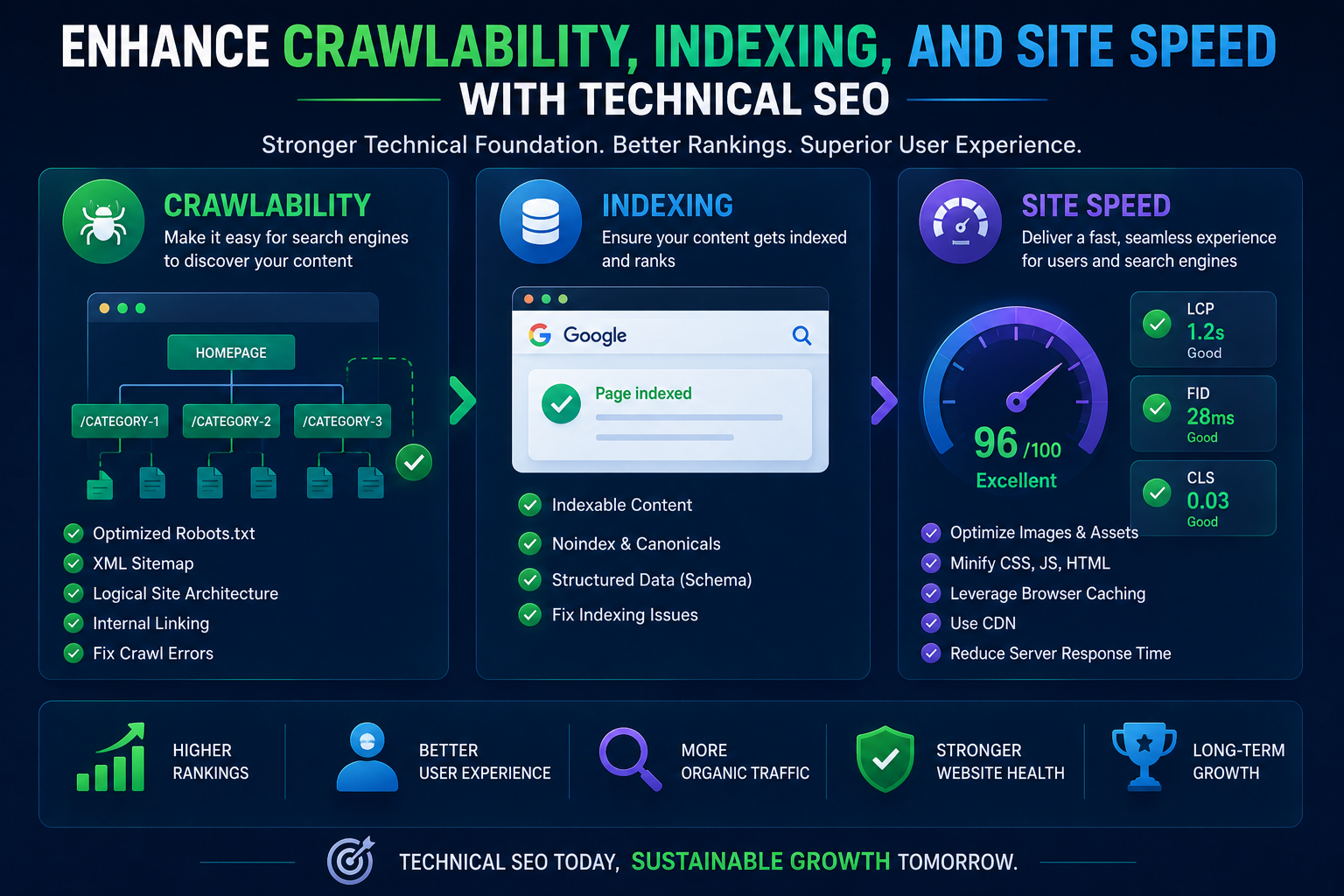
Your website may have excellent content, attractive design, and valuable services, but none of these matter if search engines cannot properly crawl, index, and rank your pages. Technical SEO creates the foundation that helps search engines understand your website while providing visitors with a faster and smoother experience.
As search engines continue to prioritize user experience, technical SEO has become an essential part of every successful digital marketing strategy. Whether you manage a healthcare website, an eCommerce store, or a local business, improving crawlability, indexing, and site speed directly influences your search visibility and conversions.
This guide explains how you can strengthen your website’s technical health and create a stronger foundation for long-term organic growth.
Technical SEO focuses on optimizing your website’s infrastructure rather than its written content. It ensures search engines can easily discover, crawl, interpret, and index every important page.
When your website is technically optimized, you benefit from:
Unlike short-term SEO tactics, technical improvements continue delivering value long after implementation.
Search engine bots constantly visit websites looking for new and updated pages. If they cannot efficiently crawl your website, your content may never appear in search results.
You should focus on creating a website structure that allows search engines to move naturally from one page to another.
Best practices include:
Organize your pages into clear categories with simple navigation.
Every important page should be accessible within a few clicks from the homepage.
Internal links help search engines discover pages while distributing authority across your website.
Instead of generic phrases like “Click Here,” use descriptive anchor text that explains the linked page.
For example, naturally link to your Healthcare SEO Company service page when discussing healthcare digital marketing solutions.
XML sitemaps tell search engines which pages deserve crawling and indexing.
Update your sitemap whenever you publish:
Submit the sitemap through Google Search Console and Bing Webmaster Tools.
Your robots.txt file controls crawler access.
Allow search engines to crawl valuable pages while preventing access to:
Avoid accidentally blocking important pages.
Monitor crawl issues regularly using website auditing tools.
Common problems include:
Resolving these issues improves crawl efficiency.
Being crawled does not automatically mean your pages will be indexed.
Indexing allows search engines to store and display your pages in search results.
Here are several ways you can improve indexing.
Duplicate pages confuse search engines.
Use canonical tags to identify the preferred version of similar pages.
Avoid publishing nearly identical content across multiple URLs.
Canonical tags help search engines understand which version of a page should appear in search results.
They also consolidate ranking signals.
Ensure valuable pages use:
Index, Follow
Avoid accidentally applying:
Noindex
to pages that should rank.
Every indexed page should provide genuine value.
Expand weak pages with:
Quality content supports stronger indexing.
Your URLs should be:
Example:
example.com/technical-seo-guide
Avoid unnecessary numbers and symbols.
Website speed directly affects rankings, conversions, and customer satisfaction.
Visitors expect websites to load within seconds.
Slow websites often experience:
Fortunately, you can significantly improve loading speed.
Large images slow down websites.
Use modern image formats like:
Resize images before uploading.
Compress images without sacrificing quality.
Browser caching stores website resources on visitors’ devices.
Returning users enjoy significantly faster page loading.
Remove unnecessary:
Minification reduces file sizes and improves loading speed.
Compression reduces website files before they are transferred to browsers.
Smaller files load faster.
CDNs store copies of your website across global servers.
Visitors access the closest server, reducing loading time worldwide.
A fast hosting provider plays a critical role in technical SEO.
Consider:
Reliable servers improve website performance.
Google measures user experience through Core Web Vitals.
The three primary metrics include:
Measures loading performance.
Aim for under 2.5 seconds.
Measures responsiveness.
Fast interaction creates better user experiences.
Measures visual stability.
Prevent unexpected layout movement while pages load.
Improving these metrics contributes to stronger rankings.
Most users browse websites using smartphones.
Search engines primarily evaluate the mobile version of your website.
You should ensure:
Mobile-friendly websites consistently perform better.
Website security builds user trust and supports SEO.
Always use HTTPS encryption.
Additionally:
Secure websites protect both users and search visibility.
Schema markup helps search engines better understand your content.
Popular schema types include:
Structured data can generate rich search results that improve click-through rates.
Technical SEO also supports Local SEO performance.
Optimize:
Faster local websites often achieve stronger visibility in nearby searches.
Technical SEO requires continuous monitoring.
Schedule regular audits to identify new issues before rankings decline.
Monitor:
Routine maintenance keeps your website healthy.
Avoid these common problems:
Correcting these issues can produce measurable ranking improvements.
Technical SEO involves hundreds of ranking factors that continuously evolve.
Working with an experienced Healthcare SEO Company helps you identify hidden technical issues, improve crawl efficiency, enhance website speed, and create a scalable SEO strategy tailored to your business goals.
Professional technical SEO audits also uncover opportunities that manual reviews often overlook.
If you’re ready to improve your website’s search performance, Contact Us to schedule a comprehensive technical SEO consultation and discover how your website can achieve sustainable organic growth.
Technical SEO is the foundation of every successful SEO strategy. By improving crawlability, strengthening indexing, increasing website speed, optimizing Core Web Vitals, and maintaining your site’s technical health, you create a better experience for both search engines and users.
Rather than viewing technical SEO as a one-time project, make it an ongoing part of your website maintenance. Regular audits, continuous monitoring, and proactive improvements will help your website remain competitive as search engine algorithms evolve.
Investing in technical SEO today builds stronger rankings, increased visibility, higher traffic, and better business results tomorrow.
Technical SEO improves your website’s infrastructure so search engines can crawl, index, and rank pages efficiently while enhancing user experience and website performance.
A comprehensive technical SEO audit should be performed every three to six months, with continuous monitoring for crawl errors, speed issues, and indexing problems.
Yes. Faster websites improve user experience, reduce bounce rates, and contribute to better rankings through Google’s Core Web Vitals.
Good crawlability allows search engines to discover your important pages quickly, ensuring they can be indexed and appear in search results.
Yes. Mobile optimization, fast loading speeds, structured data, secure websites, and clean site architecture all strengthen local search visibility.