

Healthcare SEO: XML Sitemap Best Practices
Sep 25, 2026


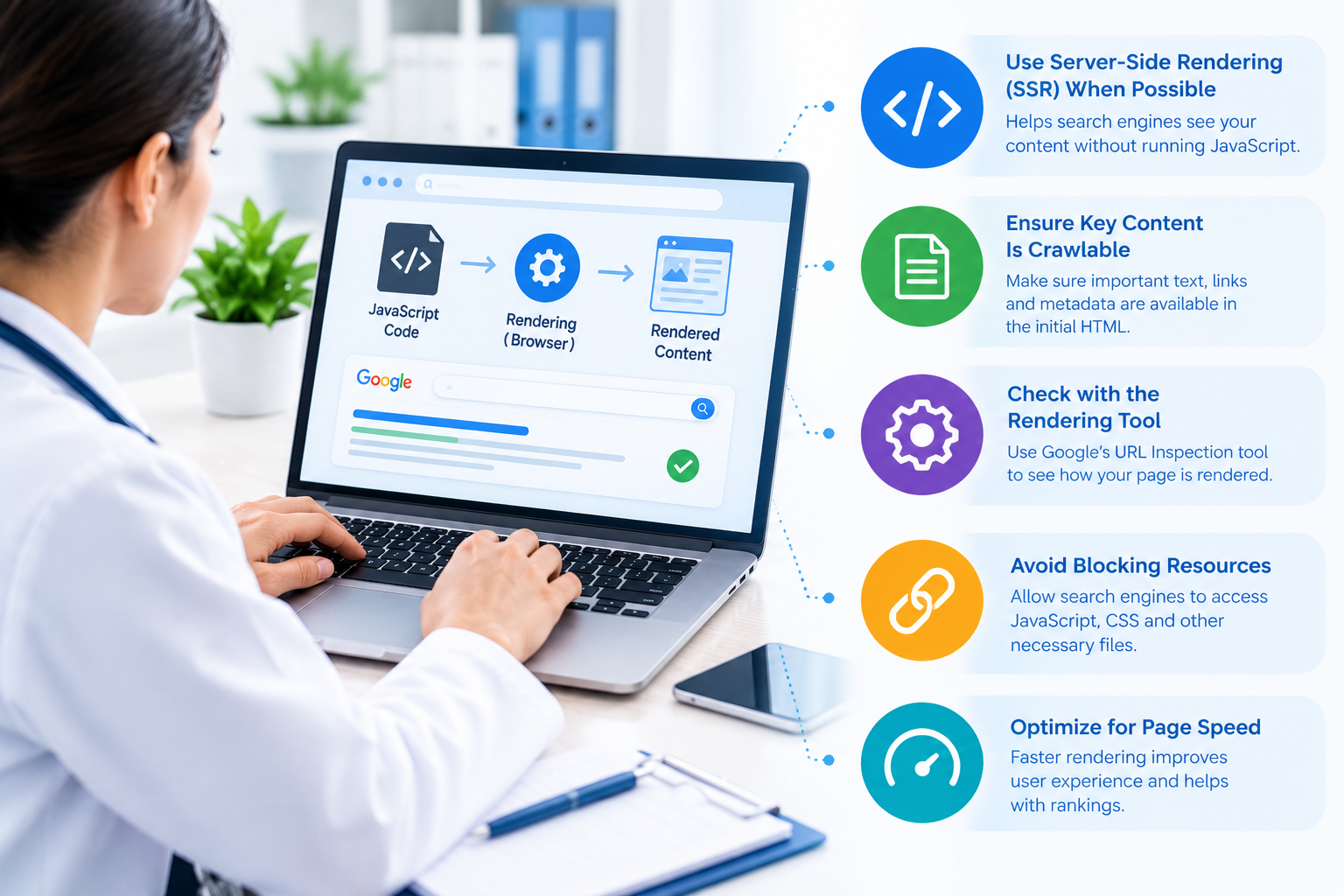
Your healthcare website needs to do more than look professional. It must help patients, search engines, and AI-powered search systems access and understand your content. This becomes more challenging when your website relies heavily on JavaScript to load pages, display content, or create interactive features.
JavaScript can improve the patient experience by making websites faster, more interactive, and easier to navigate. However, if important healthcare content depends entirely on JavaScript rendering, search engines may not always process that information as efficiently as they could with directly available HTML content.
Understanding the relationship between healthcare SEO and JavaScript rendering helps you create a website that supports both users and search visibility. You can maintain interactive features while making sure your medical services, provider information, location details, educational content, and other important pages remain accessible to search engines.
JavaScript rendering is the process through which a browser or search engine processes JavaScript code to display a webpage and its content.
A basic HTML page can deliver text, headings, links, images, and other elements directly to the browser. With a JavaScript-heavy website, some of that information may not appear until JavaScript executes.
For example, your healthcare website may initially load a basic page structure. JavaScript can then retrieve provider profiles, treatment descriptions, appointment information, reviews, or location details from another source and place them on the page.
This approach can create a smooth user experience. However, your SEO strategy needs to account for how search engines discover and process the resulting content.
Healthcare websites often contain information that directly supports patient decisions. You may publish service pages, physician profiles, treatment explanations, insurance information, FAQs, locations, and educational resources.
If important information is difficult for search engines to access, your pages may have trouble communicating their relevance.
When you invest in Healthcare SEO Company services, you should also evaluate how your website handles JavaScript. A technically strong SEO strategy cannot reach its full potential if critical content is hidden behind rendering problems.
JavaScript rendering can affect several areas of SEO, including:
Your objective is not to eliminate JavaScript. Instead, you should use it carefully while ensuring that essential content remains accessible.
Search engines generally work through several stages when processing a webpage. They discover a URL, crawl the page, process available resources, render JavaScript when necessary, and determine what content can be indexed.
Rendering can require additional processing compared with a page where the important content is already present in the HTML.
This distinction matters when your healthcare website depends on JavaScript for essential information.
For example, suppose your service page initially contains only a heading such as “Medical Services,” while JavaScript later loads detailed descriptions for cardiology, dermatology, or urgent care. You should verify that search engines can successfully render and access those descriptions.
Do not assume that content visible in your browser is automatically available to search engines in the same way.
Your most valuable content should not depend unnecessarily on complicated JavaScript processes.
Make sure important information such as the following is accessible:
You can still use JavaScript for filters, appointment interfaces, calculators, menus, patient portals, and other interactive functions. The key is to avoid making essential search content inaccessible without JavaScript execution.
Server-side rendering, or SSR, generates webpage content on the server before sending it to the browser.
For a healthcare website, SSR can make important content available earlier in the page-loading process. This can be particularly useful when your website uses a JavaScript framework.
You do not necessarily need to convert your entire website to SSR. Instead, evaluate which pages benefit most from server-generated content.
High-value pages may include:
Discuss your rendering approach with your developer and SEO team before making major technical changes. Your goal should be to balance performance, functionality, accessibility, and search visibility.
One of the most practical ways to identify JavaScript SEO problems is to compare the original HTML with the rendered page.
Look at what is available before JavaScript executes and what appears after rendering.
If a service description, internal link, heading, or important piece of patient information appears only after JavaScript runs, investigate whether search engines can access it reliably.
You should pay particular attention to pages that receive organic traffic or target valuable healthcare keywords.
A rendering audit can help identify missing content, broken links, delayed elements, and technical issues that may otherwise remain unnoticed.
Internal links help search engines understand the relationship between your healthcare pages.
For example, your main service page might link to specialty pages, provider profiles, treatment resources, and location pages. If these links are created in a way that search engines cannot reliably process, you may weaken your site’s internal linking structure.
Use standard, crawlable links whenever possible.
Your navigation should provide clear paths between related pages. You should also avoid relying exclusively on JavaScript events or complicated interface elements for important internal navigation.
A patient should be able to move easily from a service page to a provider page, and search engines should be able to understand those connections too.
Local SEO is especially important for clinics, hospitals, medical practices, dentists, specialists, urgent care centers, and other healthcare providers serving defined geographic areas.
Your location information should be clearly accessible on relevant pages.
Include useful details such as:
If this information is loaded dynamically through JavaScript, test whether it remains accessible to search engines.
You should also maintain consistency between your website and your Google Business Profile and other important business listings. Location pages should provide genuine value rather than simply repeating a city name throughout the page.
Structured data helps search engines interpret information about your healthcare organization, services, providers, locations, and other entities.
However, simply adding schema through JavaScript does not guarantee that everything will work as intended.
Review your implementation carefully and validate the structured data on important pages. Make sure the markup accurately represents visible, relevant information on the page.
Avoid adding structured data solely for search-engine manipulation. Your markup should accurately describe the content and entity represented on the page.
Rendering is not only an indexing issue. Excessive JavaScript can also affect website performance.
Large JavaScript files, unnecessary third-party scripts, inefficient code, and delayed resource loading can increase the amount of work required before a page becomes fully usable.
For your healthcare website, review:
Improving JavaScript performance can support a better experience for patients, particularly people accessing your website through mobile devices or slower connections.
Many patients search for healthcare information from smartphones. Your mobile experience therefore deserves special attention.
Check whether JavaScript-dependent elements work correctly on smaller screens. Test navigation, service information, provider profiles, forms, appointment buttons, location details, and other important components.
Do not limit testing to one browser or device.
You should review important pages across multiple environments and confirm that essential information remains accessible and usable.
Several problems repeatedly create unnecessary SEO challenges.
One common mistake is hiding the primary page content behind JavaScript. Another is using JavaScript-generated links that search engines may not process as reliably as standard links.
You should also watch for:
Regular technical SEO audits can help you identify these issues before they affect a large portion of your website.
Search behavior is changing as users increasingly rely on AI-powered search experiences to research healthcare topics.
Your content still needs to be discoverable, understandable, and well structured before AI systems can potentially use it as a source.
Clear headings, concise answers, descriptive page content, strong internal linking, accurate entity information, structured data, and accessible HTML can all support machine understanding.
For AEO and GEO, focus on answering real patient questions directly. Explain services clearly, define medical terms where appropriate, provide location information, and organize information into logical sections.
Do not create content exclusively for AI systems. Write useful content for people first while making the underlying information easy for search technologies to process.
You can make JavaScript rendering part of your regular technical SEO process rather than treating it as a one-time issue.
Start by identifying your most important healthcare pages. Review how their content is delivered, check rendered versions, test internal links, validate structured data, and monitor indexing.
Then prioritize issues according to their potential impact.
For example, if a critical service page fails to display its main content during rendering, address that issue before spending time on minor technical improvements.
If your healthcare website has complex JavaScript functionality, working with an experienced [healthcare SEO team] can help you coordinate technical SEO, content, local optimization, and website development more effectively.
Use this checklist during your next healthcare website audit:
This process helps you identify technical problems before they become larger visibility issues.
JavaScript can make your healthcare website more interactive and useful, but it should not prevent search engines from accessing important information.
You should treat rendering as an important part of technical healthcare SEO. Make your core content accessible, maintain crawlable internal links, monitor structured data, improve JavaScript performance, and test important pages regularly.
When technical accessibility and useful healthcare content work together, you create a stronger foundation for traditional search, local discovery, and AI-driven search experiences.
If you need help reviewing technical SEO, rendering, indexing, or healthcare search visibility, use the [Healthcare SEO contact page] to discuss your website requirements.
JavaScript rendering is the process of processing JavaScript so webpage content and interactive elements can appear. It matters because important healthcare information should remain accessible to search engines as well as patients.
Yes. If essential content depends heavily on JavaScript and cannot be rendered or accessed properly, search engines may have difficulty processing that information. Testing rendered pages can help you identify potential indexing problems.
No. JavaScript can provide valuable functionality and improve user experiences. Instead, you should make sure important SEO content, links, metadata, and structured information remain accessible while JavaScript handles appropriate interactive features.
Compare the page’s source HTML with its rendered version, check for JavaScript errors, review important URLs in Google Search Console, test internal links, and examine whether essential content appears after rendering.
Healthcare patients often need location, service, provider, phone, and appointment information. If JavaScript prevents search engines from accessing these details, local search visibility and page discoverability may be affected.